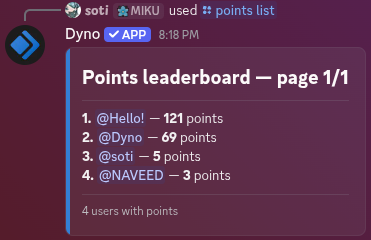
Use the points command to give/remove points to/from a user, to view a user’s points, or to view the server’s leaderboard.
¶ /points get
View a user’s points.
Cooldown: 3 seconds
Slash Command
Arguments
The user to view the points of. Defaults to yourself.
Example
/points get user:chipped
Mention Command
e.g. @Dyno points get chipped
Example
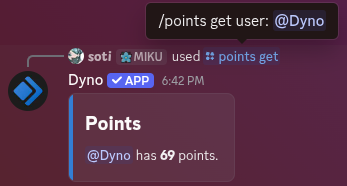
With the Dyno Battle Pass you can include your banner in the command’s response!
¶ /points increase
Add points to a user.
Cooldown: 3 seconds
Slash Command
Arguments
The user that will receive the points.
The amount of points to give.
Example
/points increase user:chipped amount:69
Mention Command
e.g. @Dyno points increase chipped 69
Example
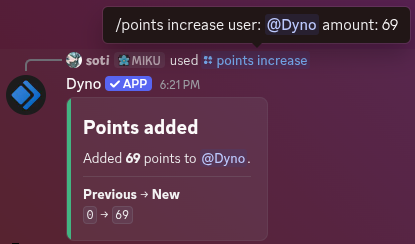
This command can only be used by Managers by default. If you’d like to create a command where a server member can give someone else 1 point at a time, it’s recommended to create a Custom Command instead (since with this command they’d be able to give an arbitrary amount of points). We have prepared this template that you can use for that!
Additionally, you should also check out the Point Triggers feature of the module.
¶ /points decrease
Remove points from a user.
Cooldown: 3 seconds
Slash Command
Arguments
The user that will lose the points.
The amount of points to remove.
Example
/points decrease user:chipped amount:69
Mention Command
e.g. @Dyno points decrease chipped 69
Example
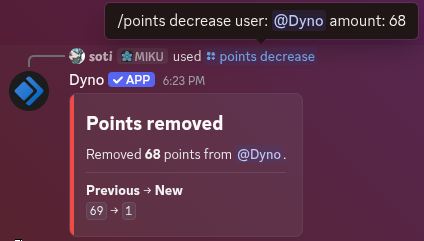
This command can only be used by Managers by default.
¶ /points list
Show the guild points leaderboard.
Cooldown: 3 seconds
Slash Command
Arguments
The page to jump to.
Example
/points list
Mention Command
e.g. @Dyno points list
Example