With the role command, you can manage the roles of a user.
These commands, by design, are able to manage any roles that are below Dyno’s highest role - hence why it’s limited to Admins/Dyno Managers by default.
¶ role user
Add/remove a user to a role or roles.
Cooldown: 5 seconds
Mention Command
e.g. @Dyno role user NoobLance Members
e.g. @Dyno role user NoobLance +Members, -Unverified
Example
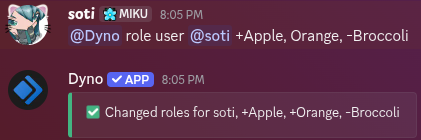
This sub-command does not have a slash command counterpart due to Discord limitations when it comes to how arguments work. You can use the /role add, /role remove and /role toggle commands accordingly instead.
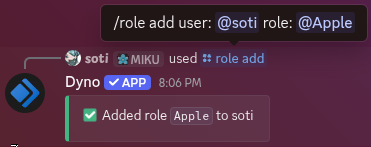
¶ /role add
Add a user to a role or roles.
Cooldown: 5 seconds,
Slash Command
Arguments
The user to add a role to.
The role to add.
Example
/role add user:NoobLance role:Members
Mention Command
e.g. @Dyno role add NoobLance Members
Example
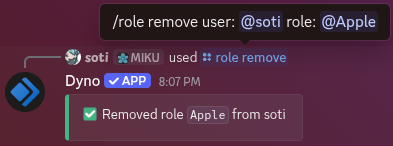
¶ /role remove
Remove a user from a role or roles.
Cooldown: 5 seconds
Slash Command
Arguments
The user to remove a role from.
The role to remove.
Example
/role remove user:NoobLance role:Members
Mention Command
e.g. @Dyno role remove NoobLance Members
Example
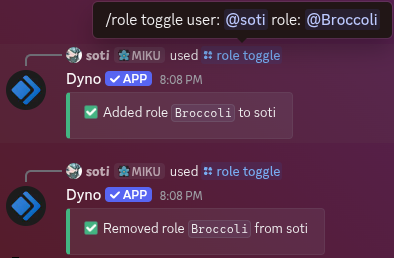
¶ /role toggle
Toggle a user from a role.
Cooldown: 5 seconds
Slash Command
Arguments
The user to toggle a role for.
The role to toggle.
Example
/role toggle user:NoobLance role:Members
Mention Command
e.g. @Dyno role toggle NoobLance Members
Example
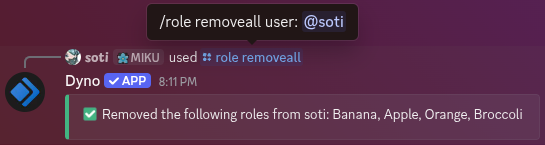
¶ /role removeall
Remove all roles from a user.
Cooldown: 5 seconds
Slash Command
Arguments
The user to remove all roles from.
Example
/role removeall user:NoobLance
Mention Command
e.g. @Dyno role removeall NoobLance
Example
¶ /role all
Add/remove all users to or from a role.
Cooldown: 5 seconds
Slash Command
Arguments
The role to mass add/remove.
Whether to remove the role from all users instead of adding. Defaults to false.
Example
/role all role:Members remove:False
Mention Command
e.g. @Dyno role all Members
Example
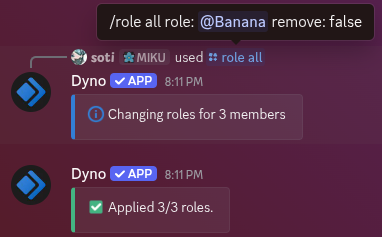
You can only make Dyno mass add/remove roles once at a time. To check the progress of any ongoing mass role changes, use the /role status command. Use the /role cancel command to cancel it.
¶ /role humans
Add/remove all users (excluding bots) to or from a role.
Cooldown: 5 seconds
Slash Command
Arguments
The role to mass add/remove.
Whether to remove the role from all humans instead of adding. Defaults to false.
Example
/role humans role:Members remove:False
Mention Command
e.g. @Dyno role humans +Members
Example
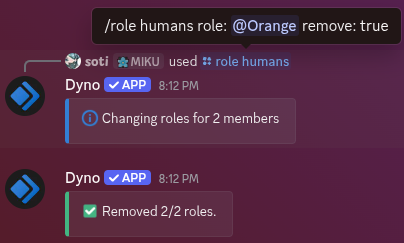
You can only make Dyno mass add/remove roles once at a time. To check the progress of any ongoing mass role changes, use the /role status command. Use the /role cancel command to cancel it.
¶ /role bots
Add/remove all bots to or from a role.
Cooldown: 5 seconds
Slash Command
Arguments
The role to mass add/remove.
Whether to remove the role from all bots instead of adding. Defaults to false.
Example
/role bots role:Members remove:True
Mention Command
e.g. @Dyno role bots +Members
Example
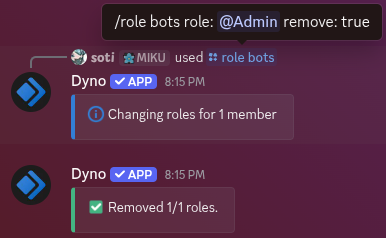
You can only make Dyno mass add/remove roles once at a time. To check the progress of any ongoing mass role changes, use the /role status command. Use the /role cancel command to cancel it.
¶ /role in
Add/remove all users to or from a role if they are in a specified role.
Cooldown: 5 seconds
Slash Command
Arguments
The role to add/remove users to/from.
The role users must be in for the action to apply.
Whether to remove the role from users instead of adding. Defaults to false.
Example
/role in in_role:Police role:Staff
Mention Command
e.g. @Dyno role in Members, -Bots
Example
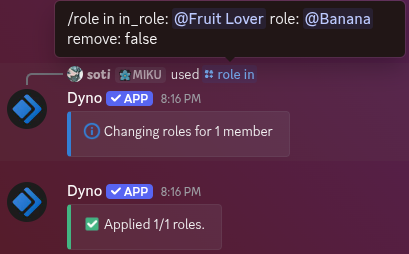
You can only make Dyno mass add/remove roles once at a time. To check the progress of any ongoing mass role changes, use the /role status command. Use the /role cancel command to cancel it.
¶ /role status
Check the current mass role assignment status.
Cooldown: 5 seconds
Slash Command
Example
/role status
Mention Command
e.g. @Dyno role status
Example

¶ /role cancel
Cancel the current mass role assignment.
Cooldown: 5 seconds
Slash Command
Example
/role cancel
Mention Command
e.g. @Dyno role cancel
Example

Cancelling a mass role assignment will not also revert any changes already made.