¶ How to Unfollow #dyno-updates
If you’re receiving updates from our #dyno-updates channel, that means you manually followed that channel from our server, or you added it as an Updates Channel on the dashboard.
Don’t want to receive published announcements from the Dyno server in your server anymore? Follow either of the options on this guide to unfollow your channel.
¶ Through our dashboard
- Head over to your account and select your server.
- In the
Bot Settingspanel, remove your channel from theUpdates Channeloption. - Save the changes.
You can always follow the channel again! Just re-add the channel you want in the Updates Channel option and save.
¶ Through Discord
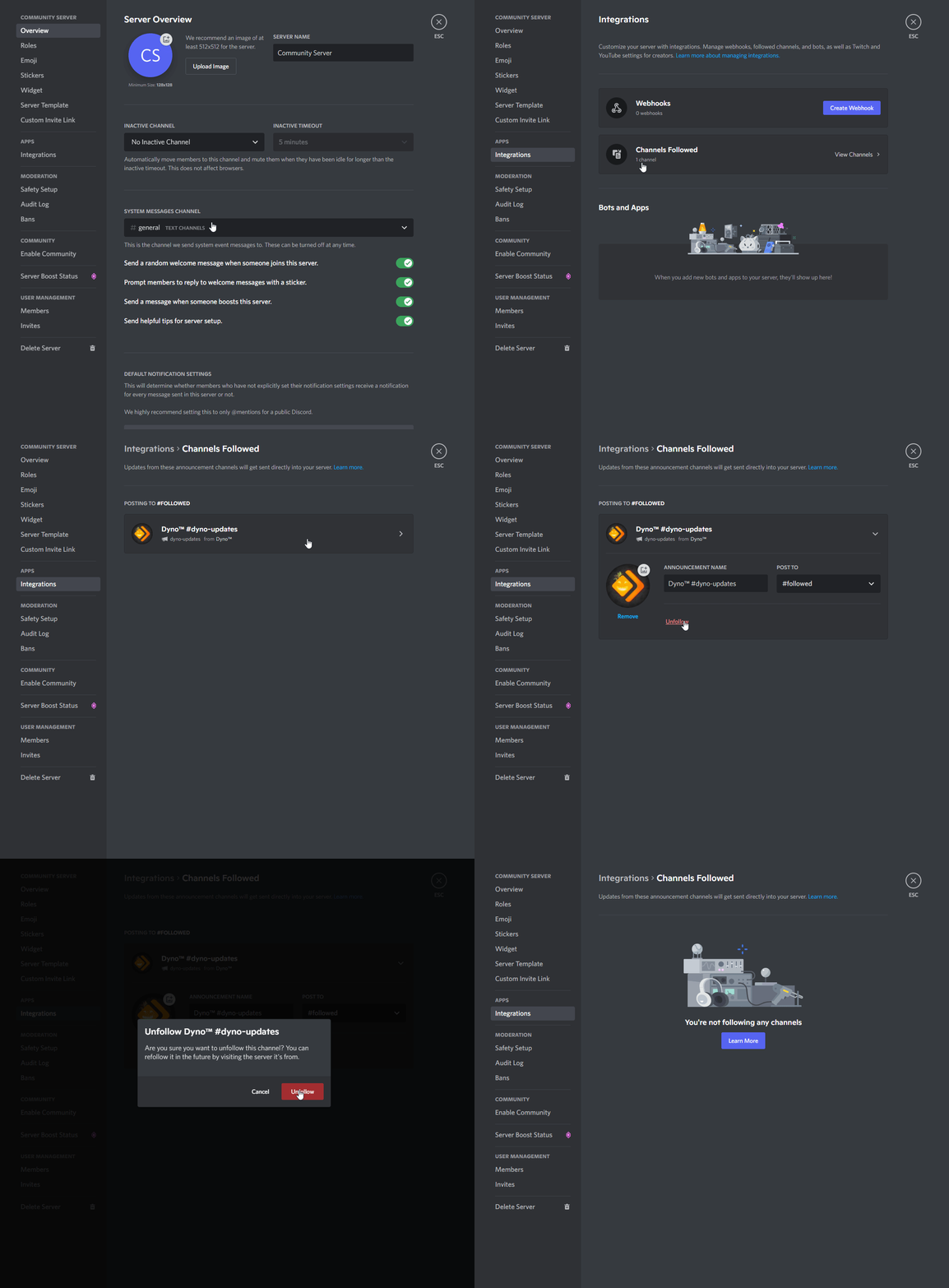
Only users with the
Manage Webhookspermission can follow/unfollow channels.
- While in your server, navigate to your
Server Settings. - Click on the
Integrationstab and selectChannels Followed. - Find the channel you want to unfollow and select it.
- Click the
Unfollowbutton.
You can always follow the channel again! Just navigate back to the Dyno server, find the channel you want to follow, and click the Follow button.
For more information about Announcement Channels, check out this Discord help article.