¶ Overview
The Action Log module allows you to keep track of all the different things happening within your server, from message deletions to members joining and leaving. Dyno will help you and your moderators keep track of the changes happening inside of your server. All events that the Action Log module handles can be found below.
Permissions Check
- Make sure Dyno has these permissions in your Action Log channel:
Manage WebhooksView ChannelSend Messages
¶ How to set up Action Log
- Head over to your account and select your server.
- Locate the
Modulestab. - Ensure that the
Action Logmodule is enabled. - Click the
Settingsbutton underneath the Action Log module. - Check the
Specify Channels for Each Eventbox if you wish to choose a specific channel for each log event. - Enable the events you want or set a channel for them if you selected the
Specify Channelsoption. - Select any channels you want to be ignored. Dyno will not log any events for these channels. You can also select categories.
- Select any roles you want to be ignored. Deleted messages sent by these roles will not be logged.
This module uses webhooks. Click here to learn more about webhooks.
¶ What log events are there?
- Message Delete | Logs whenever a member deletes their message. This is a cache-based event.
- Message Edit | Logs whenever a member edits their message. This is a cache-based event.
- Image Delete | Logs whenever a message containing an image is deleted. This is a cache-based event.
- Bulk Message Delete | Logs whenever 2 or more messages are bulk deleted in a channel.
- Log Invites/Invite Info | Logs the information about a server invite, when a member posts one in your server.
- Moderator Commands | Logs whenever a Manager/Moderator command is used.
- Member Join | Logs whenever a member joins your server.
- Member Leave | Logs whenever a member leaves your server and what roles they had if any.
- Member Role Add | Logs whenever a member is given a new role. This is a cache-based event.
- Member Role Remove | Logs whenever a role is removed from a member. This is a cache-based event.
- Member Timeout | Logs whenever a member receives a Timeout and when it expires. This is a cache-based event.
- Member Ban | Logs whenever a member is banned from your server.
- Member Unban | Logs whenever a member is unbanned from your server.
- Role Create | Logs whenever a new role is created in your server.
- Role Delete | Logs whenever an existing role is removed from your server.
- Role Update | Logs whenever the color of an existing role is changed in your server.
- Channel Create | Logs whenever a new channel is created in your server.
- Channel Update | Logs whenever a channel’s permissions get updated.
- Channel Delete | Logs whenever an existing channel is removed from your server.
- Emoji Create | Logs whenever a new emoji gets added.
- Emoji Name Change | Logs whenever an emoji gets renamed.
- Emoji Delete | Logs whenever an emoji gets deleted.
- Voice Channel Join | Logs whenever a member joins a voice channel.
- Voice Channel Leave | Logs whenever a member leaves a voice channel.
- Voice Channel Move | Logs whenever a member is moved from one voice channel to another. This is a cache-based event.
The Log Invites/Invite Info filter is currently globally disabled.
Events that are “cache-based” rely on the user trigerring them to be in Dyno’s cache at the time the event takes place. Otherwise, some events may be missed.
Message Deletion Logs
Dyno only caches the last 10 messages per channel. This means that if you delete a message in a channel that is 11 messages up or above, Dyno will not post a message deletion log.
- Premium Dyno will cache the last 100 messages per channel.
- Dyno will not log who deleted the message.
- Messages sent by bots are not logged.
If the message contains a file or embed, Dyno will not log the file or embed content, which may result in the message deletion log showing no content for the message.
¶ Additional Options
This option allows you to specify a log channel for every single log event. If you select a specific channel for a log event, Dyno will log messages to the selected channel instead of the main log one.
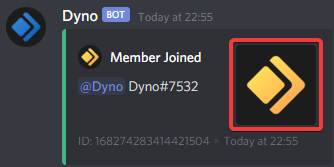
This option allows you to choose whether you wish to view a large version of the users avatar whenever they join or leave, as shown below.
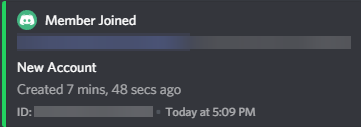
This option is for the “Member Joined” event. It will show for any account that is newer than the amount of days you set in the setting, as shown below.
¶ Troubleshooting Steps
- Make sure Dyno has the permissions specified here.
- Use the command
?diagnose actionlog, if the Module is disabled, use the command?module actionlogto enable it. - If you recently had a large event or raid in your server, the action logs may be back queued. This can happen due to discord ratelimits, it should resolve itself after an hour or two.