¶ Command List
Important Info:
- For Mention Commands, the
[and]around the argument means it’s required. The(and)around the argument means it’s optional.- When an argument is
limitortime, then you can supply most human readable times. For example: 10m, 6h, 14d, 2w, 30 mins, 20 days etc.
Dyno’s prefix commands are being removed after October 13, 2026. Read more.
Click a command for more info, or use the ↗ button on a card to open it in a new tab.
¶ Update Command Settings
On the Commands tab of your server’s dashboard, you can change settings like which commands are enabled/disabled, which roles can/cannot use a command, and what channels a command can/cannot be used in.
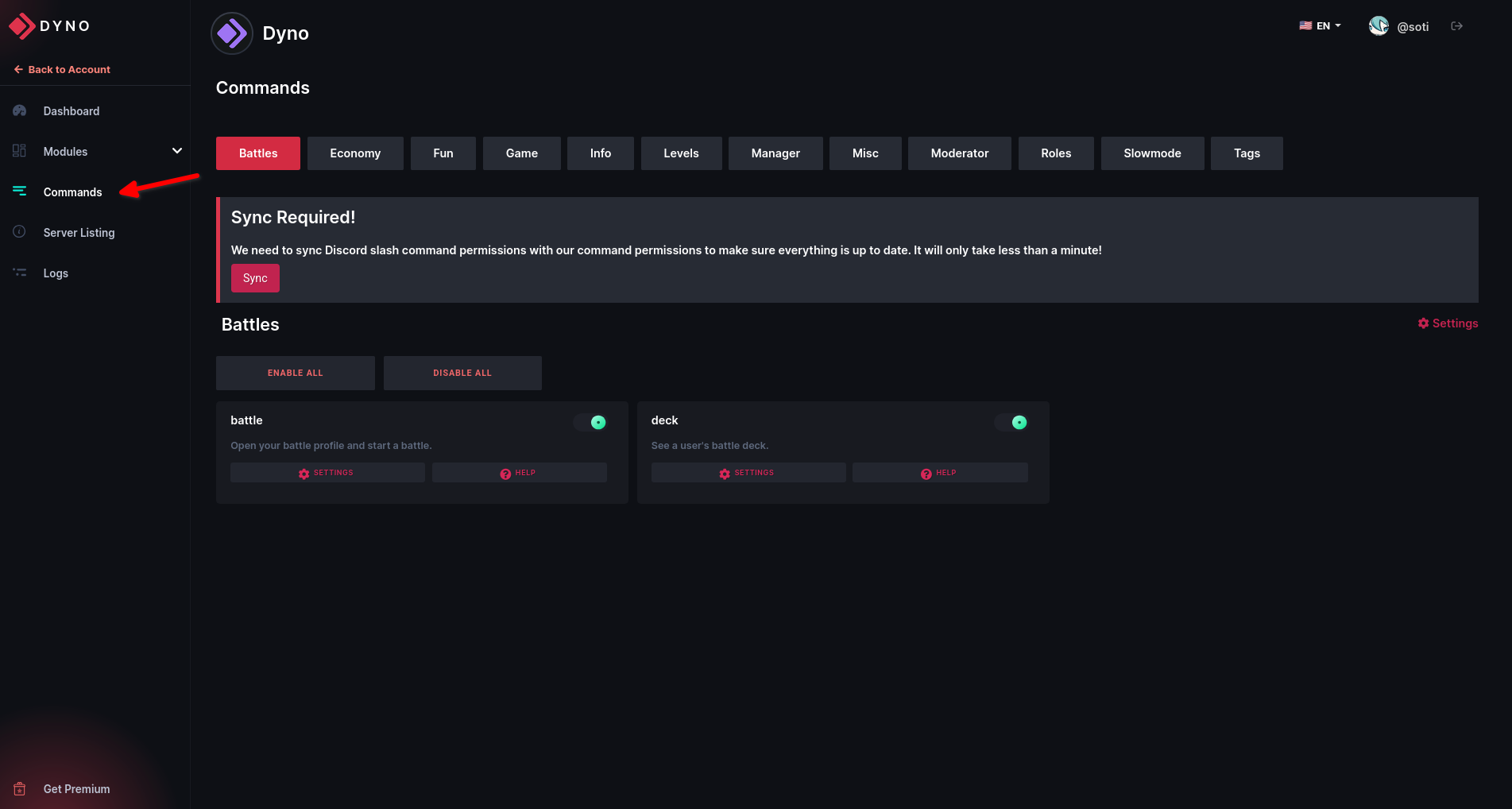
To enable or disable a command, click the slider located in the top right of the command box. To enable or disable all commands in a category, select the Enable All or Disable All button at the top of the category page. Under the Settings button, you can set Allowed/Ignored Roles and Channels for the command.
Keep in mind:
- Allowed Roles/Channels will automatically ignore all other roles/channels, so you can and must not set both Allowed and Disabled Roles/Channels.
- When editing the settings for the entire category, the settings will save to each individual command and NOT to the category settings selector itself.
- Users with a Dyno Manager role will override these additional permissions, but Moderators will not.
¶ Default Slash Command Permissions
By default, Dyno will hide moderator/manager slash commands behind the Administrator Discord permission, that way normal users will not be able to see them (since they can’t use them).
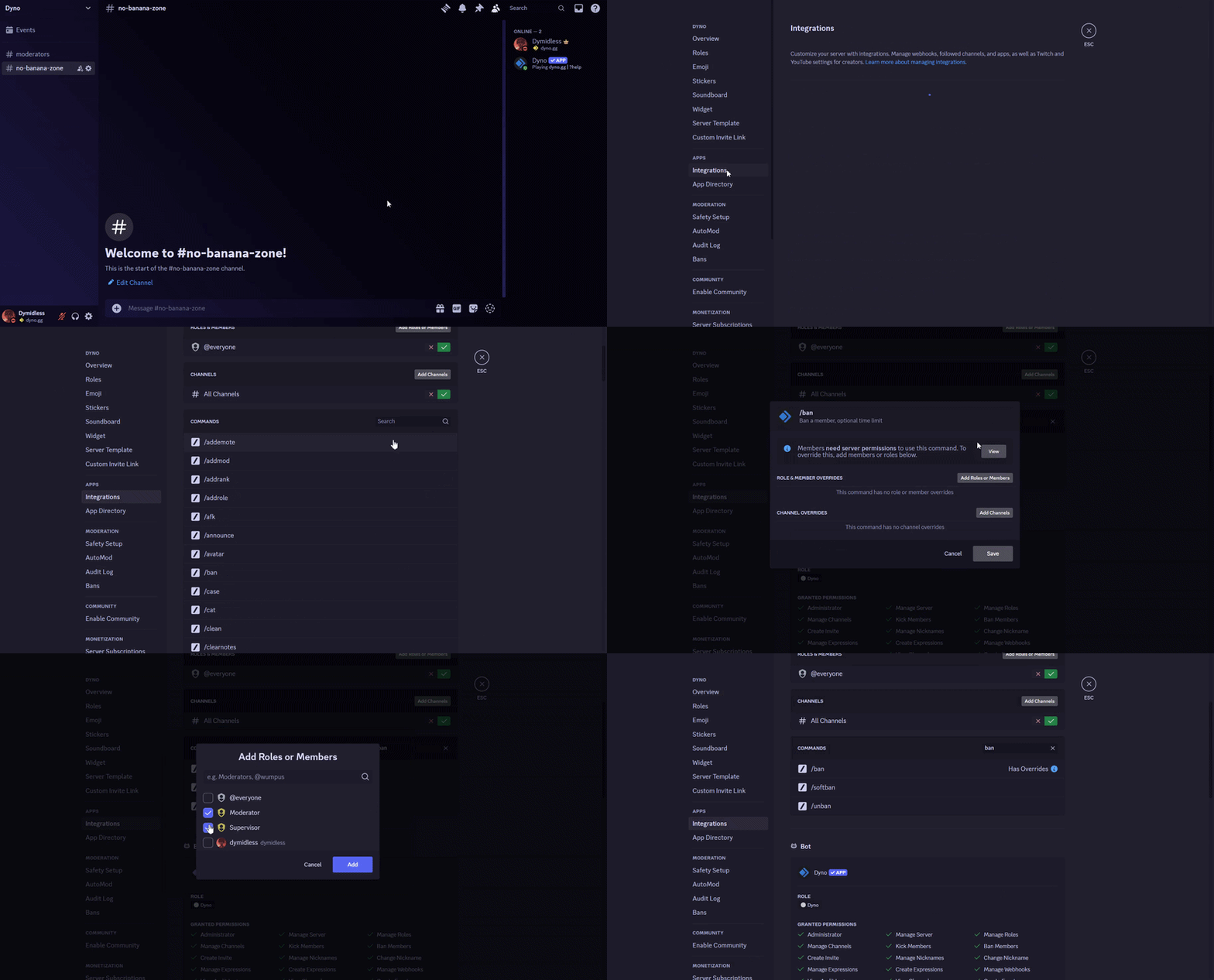
To sync your slash command permissions based on your dashboard overrides, follow the steps below:
- Head to the dashboard, log in and select your server.
- Click on the Commands tab. If you see a banner saying
Sync Required!go ahead and click onSync. Dyno will then attempt to sync the slash commands of your server (using your account) according to the overrides you have set on the dashboard, per command. - Ask your moderators to refresh their Discord and check if they can now see those slash commands.
- If they are still unable to see those specific slash commands or if you don’t see that banner, something went wrong during the sync. In that case, follow these instructions to manually add overrides to those slash commands individually, allowing your moderators to see them.
Important Notes:
- Since the sync is done through your account, the following requirements must be met first:
- Your highest role is above the roles Dyno will attempt to modify the slash command permissions for.
- You must have the
AdministratorDiscord permission.For these reasons, we’d recommend you have the server owner perform the sync in order to minimize the risk of the sync failing due to hierarchy/permission reasons.
- Since the sync is done through your account, you can see the changes made through your server’s Audit Log.
- Allowing a role to see a specific slash command does not automatically also give them permission to use it.
¶ Info
- help Get information about Dyno or a command. ↗
- Dyno info Get information about the bot. ↗
- Dyno ping Ping the bot and get the response time in milliseconds. ↗
- Dyno premium Get information about Dyno Premium. Responds in DM. ↗
- Dyno stats Get some statistics about the bot. ↗
- Dyno uptime Get the bot uptime. ↗
¶ Manager
- addemote Adds an emote to the server. ↗
- addmod Add a moderator role. ↗
- addrole Add a new server role, with optional color and hoist. ↗
- announce Send an announcement using the bot. ↗
- clearwarn Clear warnings from users. ↗
- command Enable or disable a command. ↗
- customs List, show, enable or disable Custom Commands. ↗
- delmod Remove a moderator or moderator role. ↗
- delrole Delete a server role. ↗
- giveaway Make and manage giveaways ↗
- ignorechannel Toggles command usage for a channel. (Does not affect mods and managers) ↗
- ignorerole Toggles command usage for a role. (Does not affect mods and managers) ↗
- ignoreuser Toggles command usage for a user. ↗
- language Set the server language for bot responses. ↗
- listmods List all moderators and moderator roles. ↗
- mentionable Toggles whether a role is mentionable or not. ↗
- module Enable or disable a module. ↗
- modules Quick direct link for the server’s dashboard. ↗
- nick Change the bot nickname. ↗
- prefix Get the current prefix of your server or set a new one. ↗
- purge Delete a number of messages from a channel. (limit 1000) ↗
- role Manage the roles of a user. ↗
- rolecolor Change the color of a role. ↗
- rolename Change the name of a role. ↗
- setnick Change the nickname of a user. ↗
¶ Moderator
- ban Ban a member. ↗
- case Show a single moderation case. ↗
- clean Cleanup the bot responses. ↗
- clearnotes Delete all notes about a member. ↗
- delnote Delete a single note about a member. ↗
- delwarn Clear a single warning from a member. ↗
- diagnose Diagnose any command or module in the bot to determine if there are any problems. ↗
- duration Change the duration of a timed punishment. ↗
- editnote Edit a note about a member. ↗
- ignored List ignored channels, roles and users. ↗
- kick Kick a member. ↗
- lock Lock a channel. ↗
- lockdown Lock channels defined in moderation settings. ↗
- members List members in a role or roles. ↗
- moderations Get a list of active timed moderations and remaining time. ↗
- modlogs Get a list of moderation logs for a user. ↗
- modstats Get moderation statistics for a mod/admin (may take up to 30 minutes to update). ↗
- mute Mute a member so they cannot type. ↗
- note Add a note about a member. ↗
- notes Get notes for a user. ↗
- reason Supply a reason for a moderation log case. ↗
- rolepersist Assign/unassign a role that persists if the user leaves and rejoins. ↗
- softban Softban a member (ban and immediately unban to delete their messages). ↗
- star View Starboard stats for a message ↗
- temprole Assign/unassign a role for a limited time that persists if the user leaves and rejoins. ↗
- unban Unban a member. ↗
- unlock Unlock a channel. ↗
- unmute Unmute a member. ↗
- warn Warn a member. ↗
- warnings Get warnings for a user. ↗
¶ Miscellaneous
- afk Set an AFK status to display when you are mentioned. ↗
- avatar Get the avatar of yourself or another user. ↗
- color Show a color using the hex code. ↗
- dynoavatar Generate a Dyno-like avatar. ↗
- emotes Get a list of server emojis. ↗
- highlights Get notified when a a specific phrase is said in a server. ↗
- inviteinfo Get information about a Discord invite. ↗
- membercount Get the membercount of the current server. ↗
- randomcolor Generates a random hex color with a preview. ↗
- remindme Set a reminder. ↗
- roll Roll a dice. ↗
- serverinfo Get information about the current server. ↗
- whois Get information about a user. ↗
¶ Points
¶ Fun
- cat Get some cute cat pictures. ↗
- dadjoke Get a random dad joke. ↗
- dog Get some cute dog pictures. ↗
- flip Flip a coin. ↗
- itunes Get information about an iTunes song. ↗
- pokemon Get information about a Pokémon. ↗
- poll Start a poll for people to vote on. ↗
- pug Get some cute pug pictures. ↗
- rps Play rock, papers, scissors with the bot. ↗
- space Get information about the International and Tiangong Space Stations. ↗
¶ Roles
- addrank Add a new joinable rank. ↗
- delrank Delete an existing joinable rank. ↗
- rank Join or leave a joinable rank. ↗
- ranks Get a list of joinable ranks. ↗
- roleinfo Get information about a role. ↗
- roles Get a list of server roles. ↗
¶ Levels
Levels is a Standard Premium feature.
Click here to upgrade to Premium!
- profile View a user’s current level, XP and leaderboard rank. ↗
- leaderboard View the server’s XP/level leaderboard. ↗
¶ Tags
¶ Slowmode
Slowmode is a Standard Premium feature.
¶ Economy
Economy is a gloabl module that lets you collect Dyno Coins. Click here to learn more!
- daily Claims your daily reward. ↗
- work Work to earn some coins. You can work up to 10 times per day. ↗
- pay Transfer coins to another user. ↗
- vote Vote for this server to help it get highlighted on dyno.gg. ↗
¶ Dyno Battles
These commands will not work if the Economy module is disabled.