Autoroles
The Autoroles module has two parts to it, Autoroles and Joinable Ranks.
Overview
The Autoroles module has two parts to it, Autoroles and Joinable Ranks.
Autoroles allows you to make Dyno automatically assign/remove a role after a member joins your server, either immediately or after a specified time has passed.
Joinable Ranks allows you to create roles in your server that users can join themselves using the /rank command. Users will be able to use a command to join or leave your Joinable Ranks at any time.
Permissions Check:
- Make sure Dyno has this permission in your server:
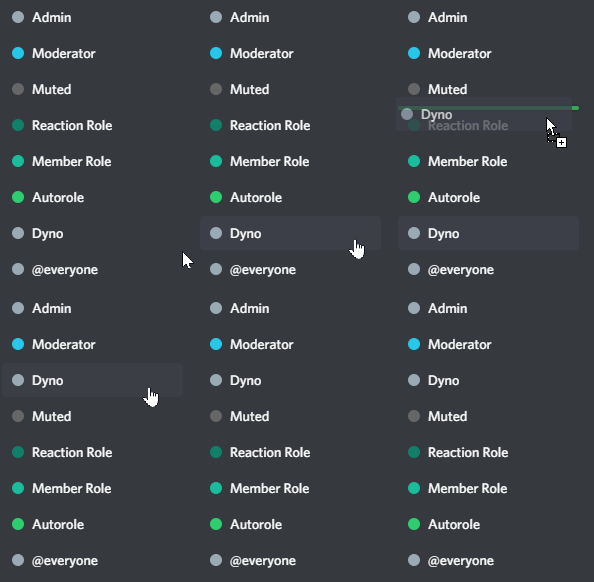
Manage Roles- Make sure Dyno's role is above the role(s) you want him to assign/remove.
Limits to keep in mind:
- Non-Premium servers can have a max of 3 autoroles.
- Non-Premium servers can have a max delay of 7 days.
- Premium servers can have a max delay of 14 days.
How to set up Autoroles
- Head over to your account and select your server.
- Click on the
Modulestab. - Ensure that the
Autorolesmodule is enabled. - Click the
Settingsbutton underneath the Autoroles module. - In the
Select Rolebox, select the role you want Dyno to give users upon join. - You can also add a
Delayfor Dyno to either add or remove the role, leave this option blank however if you wish Dyno to add the role immediately on user join. - Select if you want Dyno to add or remove the role from the user.
- Click the
Addbutton and you're all done!
Regarding autorole remove, the timer for delay starts counting when the user joins the server, not when they obtain the role.
If Dyno's role is not above the role you want him to assign/remove, the autorole will not work.
How to set up Joinable Ranks
Joinable ranks are roles that members can join using the /rank command.
Setup using the dashboard
- Head over to your account and select your server.
- Click on the
Modulestab. - Ensure the
Autorolesmodule is enabled. - Click on the
Joinable Rankstab near the top of the page. - Add a role as a new rank using the drop down menu.
- Check the box
LIMIT USERS TO ONE RANKIf you wish to have users only be able to have one rank at a time. - Click the
Addbutton and you're all done! Members can now join your ranks using the/rankcommand.
Autoroles Commands
| Command (click for more info) |
Description |
|---|---|
| /addrank | Add a new joinable rank. |
| /rank | Join or leave a joinable rank. |
| /ranks | Get a list of joinable ranks. |
| /delrank | Delete an existing joinable rank. |
Troubleshooting Steps
- Make sure Dyno has the permissions specified here.
- Keep in mind Autoroles only applies to new member joins. It will not give roles to existing members that were already in the server before setting up.
- If you are getting a large amount of users joining, or your server recently experienced a bot raid, Dyno may be back queued due to Discord ratelimits. In this case Dyno will usually still add the roles, however there may be a delay while it catches up.
- After checking all of the above, try deleting and re-adding the autorole(s).