This guide will go over the right way to get support from us depending on the type of issue you’re experiencing!
First of all we strongly urge you to take a look around our documentation (you’re already here!). There’s a very good chance your question/issue is already addressed. You could also use the search bar at the top to scour across all pages.
Here are some potentially common pages you may find helpful (you can also find these, and many more, on the side bar to the left (click the blue hamburger icon if you’re on mobile) where you will see a lot of different pages.
You can also take a look at our community made Youtube Guides! However we’d still recommend also double-checking with the relevant docs to ensure something hasn’t changed overtime.
If you’re looking to get support with the bot itself, head to our server and locate one of the following support channels:
#support: FAQ and help from Support Team members#community-support: Support from community members#support-non-english: Internationale Unterstützung / Soutien Internationale / Suporte internacional / Apoyo internacional / Uluslararası destek / الدعم الدوليIf you are a Premium user or a Battle Pass owner, you can also access our
#premium-supportchannel for priority support!
And more!
If you’re having trouble purchasing a subscription, or simply have a billing/subscription related question, join our server and DM Dave#7125 (our Modmail bot). A Dyno Staff member will assist you there when available.
More specifically, DM our Modmail for:
Notes:
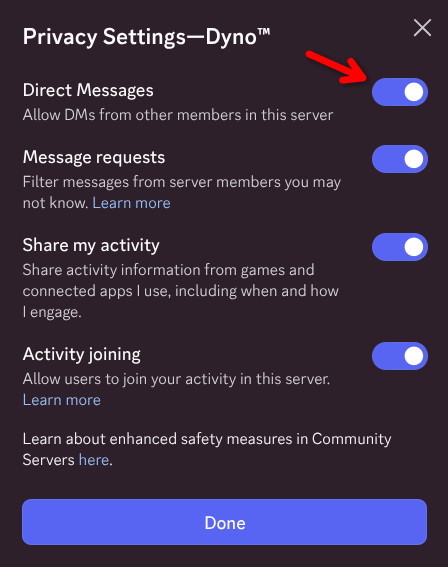
- In order to be able to DM Dave, you must have your DMs enabled. See how to easily enable them only for our server by clicking here. Don’t change those settings again until your thread has been closed, otherwise we won’t be able to respond to you!
- Our Modmail service (Dave) is for things like reporting a member, sending payment inquiries, and requesting moderation assistance from the Dyno team. We do not provide Dyno support through it - for that read the Dyno Support section of this page.
To request Access to your personal Data or to request its deletion, send an email to [email protected].
We do not provide Dyno support through our email - for that read the Dyno Support section of this page.
If you think you’ve found a bug which presents a security concern you can report the issue to us by joining our server and sending a DM to Dave#7125 (our Modmail bot). For normal bug reports, please report it through our support channels instead.
We do not represent Discord and cannot help with this issue. You should report the matter to Discord’s Trust and Safety.
If a server is explicitly using Dyno in a way which violates Discord’s Terms of Service you can report the issue to us by joining our server and sending a DM to Dave#7125 (our Modmail bot).
In order to be able to DM Dave, you must have your DMs enabled. See how to easily enable them only for our server by clicking here. Don’t change those settings again until your thread has been closed, otherwise we won’t be able to respond to you!